DEBUGGING // HUMAN ERROR
The Bug That Wasn't a Bug
Or: check your filament assignments before debugging the cloud.
I had finally reached the satisfying part of the Soccer Bag Tag project: the generator was no longer living only on my PC. A public website was talking to Cloudflare, Cloudflare was talking securely to a private Render service, and the Python generator was returning a multipart 3MF and STL files on demand.
So naturally, the next job was to try to break it.
I started feeding it longer strings. Letters. Numbers. Mixed case. The tag generated, downloaded and opened in Creality Print — and then the soccer pattern looked wrong.
I shortened the name. Still wrong. Removed another character. Still wrong. That was enough to make the problem look convincingly like geometry or scaling.
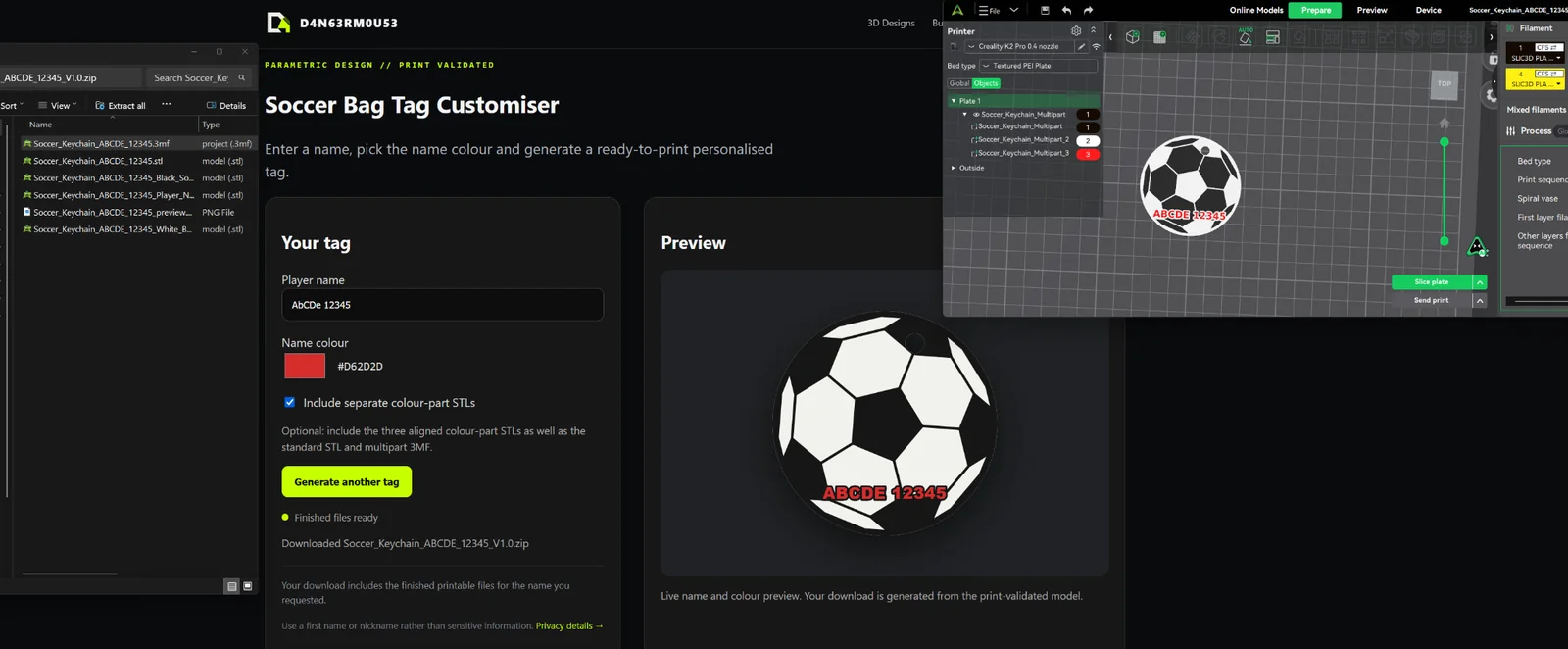
Then I looked at the filament assignments
One of the multipart objects that should have been black was assigned white in the slicer.
That was it.
The website was fine. Cloudflare was fine. Render was fine. The generator was fine. The long name was fine.
The bug was approximately forty centimetres from the keyboard.
The useful part
It is funny, but it is also a decent reminder that a 3D-print pipeline has several layers: source geometry, generator, file format, slicer import, object mapping, filament assignment and finally the physical printer.
When something looks wrong at the end of that chain, it is tempting to blame the newest or most complicated part first. In this case I had just built a cloud generation pipeline, so of course that was where my brain went.
The better debugging rule is much less exciting: verify the simplest presentation and configuration layers before tearing apart the generation logic.
The upside is that the mistake accidentally became another useful validation test: long strings containing letters and numbers generated cleanly and the multipart model still loaded correctly once I stopped sabotaging it in the slicer.
← Back to journal